PS Query - Extented use of Expression and Prompts
3 way Prompts
In this way user can able to run the query either by giving value or
giving prompt value or some part of the value.
To do so we need to,
- Create the Expression
- Create a Prompt
- Add criteria with Expression and Prompt
- Change logical mapping
- Group the criteria
Initial Query

Create the Expression
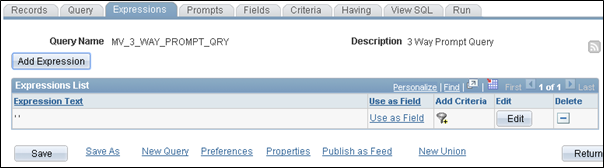
Create the Expression like below and in the Express Text give only
<single quote> <space> <singlequote>

Create a Prompt
Create a Prompt for the Field where u need a Prompt while running the
Query
Please note that here the Prompt Table been mentioned with “No Table
Edit” as Edit Type


Add criteria with Expression and Prompt
While adding criteria first select the Expression and Condition Type
should be equal to and then select the Prompt which you created
earlier.


Add other Criteria like below

Make sure here the Condition Type should be “Like” and Expression 1 Type
as Field (Field you are implementing Prompt)

Change logical mapping
Make the Logical operation between two Criteria’s as “OR”

Group the criteria
Group the “OR” clause both side Criteria’s, this will be mandatory when
you are doing complex criteria’s


Final SQL will be like this

Running Query – Way 1 (Blank Run - Complete)


Running Query – Way 2 (Specific Run – Exact)


Running Query – Way 3 (Match Run – Contains)


Here you can use % character either left or right side to accomplice
"begins with" and "ends with" kind of searches.
Comments
Post a Comment