Posts

Best alternative for Message Catalog and Strings Table

Image
HCM Text Catalog We all have definitely used Message Catalog and Strings Table for storing setup information and text definitions for notifications, master data. But, do you know there is a better alternative which not only supports in these scenarios but much more like Translation, Key based Setup, in-built HTML support and Test Utility to inquire the Catalog itself. With simple views and existing tables, we can able to create very sophisticated setup to maintain your data and which can be quickly filtered and used with delivered Application Package methods. To configure and use Text Catalog you would have to go through following steps (note, some are optional) Navigation: Set Up HCM > Common Definitions > Text Catalog and Notepad Configure the Text Catalog Maintain the Text Catalog View/Edit the text in HTML Setup Text Substitution Use View All Keys Page (to Review) Setup Translation fo...

Delivered Web Services - Query Access Service and Process Scheduler Service

Image
     Before we deep dive in to PeopleSoft delivered Web-Services, let's talk about the basics of PeopleSoft Web Service. What is it.? " It provides a way other (3rd party) applications communicate with PeopleSoft Application, using Integration Broker ".      Why Web-Service and why not other methods of integrations? like file-based if you ask, then my response would be simple. It is built on-top of existing PeopleTools Technology and provides controls for the owner system (PeopleSoft) to have necessary security (Authentication and Authorization) for data communication and standards (like SOAP and RESTful APIs) to support almost all the integrating applications. In the recent Tools version you can even create Open API consumer services.      Now, since the basics are clear, lets focus on web services that are provided by Oracle PeopleSoft out-of-the-box in the application. These services are common for any application you own, be it a HCM...

Composite Query - A clever way to filter and prune data from existing queries

Image
As the name suggests the composite query can simply combine the existing queries and can add filters, aggregates, sorts the data for presenting. All you just have to do is,  Create PS Queries Combine two or more of them Join them based on relationship Apply additional filters/prompts needed Provide Group By or Order By clauses View and schedule to get the results You might ask why would we create composite query when we already have so many PS Queries and Connected Queries which we can use to get the data we want, right?. To you the answer would be you can RE-USE the existing queries and add controls on top of it. Consider an example of having separate queries for fetching Employee Details, Salary Information and Login Details, to fetch the high paid employees login details you don't have to create a new query. Simple combine these three and create it as a composite query. Or you have Customer Information and Aging Report and wanted to get the summary report to give a follow-up cal...

Universal Data Loader

Image
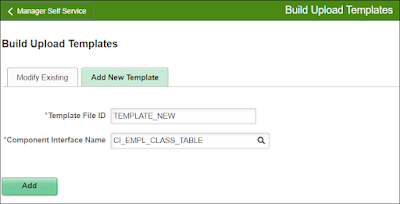
     After a decade of time, I'm back to blogging, And it's time to give back the community that helped me grow in my career and skills with some of works.      As a first step, let me present my efforts on the vision to create a common upload utility I wanted since I started as a developer. Many customers have their own modules (bolt-on or customized) developed on their application and using delivered systems only when necessary.      And once in a while they load bulk data in those modules from 3rd party, or processed with offline tools (like Excel). With this base all those customers can benefit by simply having a CI - Component Interface for the same. The process is simple as follows, You create and perfect your CI based on the data you want to load Build your own upload templates with defaults, formats, etc.,  Complete the setup to create the File Layout (CSV or Fixed format) Which can provide you the sample file in FIXED as well as...